Thứ Bảy, 3 tháng 7, 2010

iPhone 3GS Recognizes FaceTime URLs

The iPhone 3GS has been found to recognize FaceTime URLs when running iOS 4.0.

AppleInsider reader Felipe Baez discovered facetime:// URL scheme support while examining how FaceTime works.

On other iPhone models running iOS 4, FaceTime URLs are recognized as a valid URL scheme. So rather than not being clickable or resulting in an error message that the URL is "invalid" (as an unrecognized URL scheme does), iPhone 3GS users who click on a facetime:// URL get a strangely blank screen (below).

It's possible that Apple was or is planning to include partial support for FaceTime calls on devices other than the iPhone 4. This could take the form of a one way video call or perhaps an audio only call. The iPhone users who make frequent international calls would appreciate that.
Read More


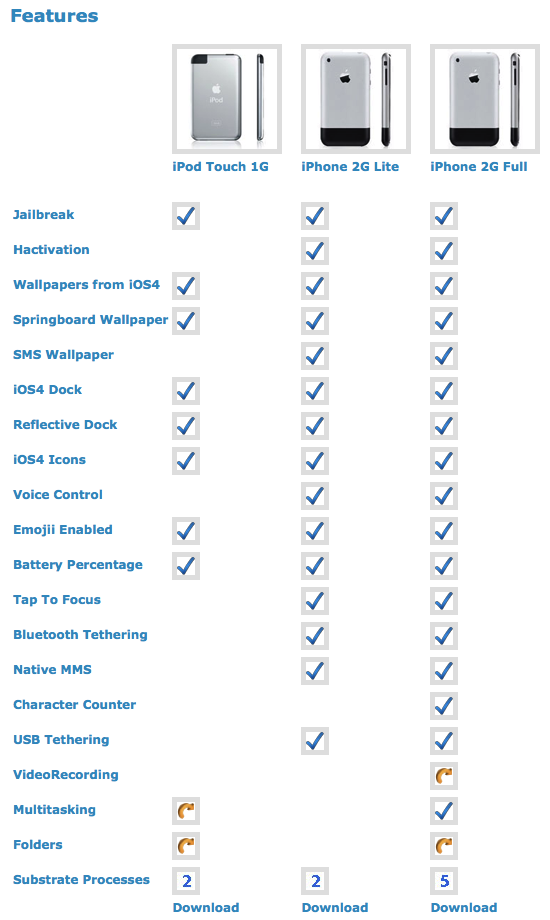
Custom Firmware Bundle Brings iOS 4 Features to Your iPhone 2G

The WhiteD00r project aims to bring iOS 4 functionality to your iPhone 2G using a custom firmware bundle.

The bundle created by Matteo Morando is based off 3.1.3 and is built using PwnageTool. It incorporates numerous utilities to add features such as multitasking, wallpaper, tethering, sms count, and more.

A beta for the iPod touch 1G has also been posted for those interested.

You can see the complete feature list below...
Read More [via iSpazio]


Jailbreak for iOS 4 on iPhone 3GS (new Bootrom) with Sn0wbreeze is Coming Soon! [Video]


There is a new video going around in the wild which shows iPhone 3GS (with new bootrom) on iOS 4 jaibroken using an upcoming version of Sn0wbreeze. This video has been confirmed by iH8sn0w – the developer behind popular iPhone jailbreak tools such as sn0wbreeze for iPhone 3.1.3 / 4.0, f0recast and BlackBreeze as legit.

From YouTube description of the video:
Quote
As of today, Im one of only a handful of regular jailbreakers to be be pwned on 4.0 with a new bootrom 3Gs. That could always change tomorrow, who knows.


iH8sn0w’s response on this:

Quote
The cool video here // Is indeed real, but requires the 3.1.2 SHSH blobs.

and Please don’t ask for a release on this. I’m not planning on it.

Alright… If anyone has their 3.1.2 SHSH blobs, NOT 3.1.3. Then I’ll see if I can produce a tool that will do this job…

Posted Image

Unfortunately though, there is a little catch to it. 1) it is a tethered jailbreak (whenever you turn off your phone, you will need to re-connect it to a computer to be able to turn it back on) and 2) it will only work for those devices which have their SHSH blobs (ECID SHSH) files for 3.1.2 (NOT 3.1.3) saved on Cydia. This jailbreak also required a special tool for rebooting as shown in the video below.

There is no ETA (Estimated Time of Arrival) on the release. According to iH8sn0w, he will “see if [he] can produce a tool that will do this job…”.

Oh and here is the video which shows iPhone 3GS (new bootrom) jailbroken on iOS 4.


Stay tuned ! We will let you know more on this as the story unfolds!

How to add symbols to your iOS 4 folder names

Posted Image

Just when you thought your folders were organized and cleverly named just right, we’re here to turn the naming game up a notch by adding symbols with Glyphboard. I’m sure many of you have a folder filled with Apple apps named “Apple”. I definitely do. But why be so boring and predictable when you can name it with the Apple logo instead? To learn how, follow us after the break!

First, you must visit http://mrgan.com/gb/ with Safari on your iPhone. Then follow the instructions to add the website as a bookmark to your homepage. Now, exit Safari and tap the bookmark you just created. This opens a web app called Glyphboard.

Posted Image

Glyphboard includes 48 characters that can be copied and pasted anywhere else on your iPhone such as email, notes, calendar, and of course, folders! Glyphboard also provides a box at the top so you can paste several icons within the web app and copy them all together. This is a time-saver for those of you that may want to use more than one character at once.
Posted Image

Now get to it! Give your folders a unique touch with Glyphboard and share your creativity. 

Thứ Sáu, 2 tháng 7, 2010

Firefox Home Submitted to Apple for Approval [Video]

Mozilla has announced that they have submitted Firefox Home to the Apple for App Store approval.
Firefox Home is a free application that provides access to your Firefox desktop history, bookmarks and open tabs on your iPhone. Firefox Home enables access to the websites you need on the go by picking up where you left off with your desktop browsing. Firefox Home uses your browser data, securely synced from Firefox on your desktop to the cloud, to let you search and browse it quickly and efficiently. You can view the sites you want directly in Firefox Home, open them in Mobile Safari or share them with friends via e-mail. Your Firefox data is private and only you have access to it.

To use Firefox Home you will need to have Firefox Sync running on your desktop.

Take a look at the video below...


Apple Posts Fix for iOS 4 Exchange Issues

Apple has posted a configuration profile which aims to fix exchange problems noticed by customers updating to iOS 4
Symptoms
Immediately after updating to iOS 4, some users may notice that Exchange ActiveSync Mail, Contacts, or Calendars do not sync, or sync very slowly. In addition, some Exchange Server administrators may notice their servers running slowly.
Resolution
To work around this issue, users should install a configuration profile from Apple that increases the amount of time the iOS 4 device will wait for the Exchange Server to respond to its sync requests. For best results, the profile should be installed on as many iOS 4 devices at your company as possible.

Click 
this link from your iOS 4 device to install the profile.
Read More [via 9to5Mac]

iTunes Wireless Streaming, Syncing Coming Soon?

An Apple source has revealed to the BGR that the company will be announcing wireless streaming and syncing for iTunes.
We have been told iTunes will be getting a huge cloud capability that many people have been asking for (and logically thought would happen sooner or later). 

These new capabilities are broken down into three groups:
1. Streaming music and movies from Apple’s servers to your computers, devices, etc.
2. Streaming music and movies from your home computers to your other computers, remote devices, etc.
3. Wireless iTunes syncing with devices

The source also says that Apple’s traditional fall event (or maybe even before it) should bring at least “two new devices with camera/camcorder capabilities.”
Read More


Bài đăng phổ biến